
How Fast Do Google Ads Work?
Last Updated on: 12th September 2025, 11:27 am
Google Ads is a fantastic way to get qualified leads, but will you get calls as soon as you hit the campaign launch button? Today, I’ll show you how fast Google Ads work and what you can do to see high returns quickly.
Let’s take a look!
How Fast do Google Ads Work? The Short Answer
Google AdWords campaigns show results after 7 days, which is the “learning phase.” However, your campaign can take up to 3 months to achieve its full potential.
(Note: This depends on your industry. If you’re running Google Ads for HVAC emergency assistance, it’s natural to see calls faster than, for example, a SaaS business.)
Don’t panic if you see few clicks and unspent funds in the first 7 days. Google will only use a portion of your resources as it learns about your business, ads, and audience to define your ad’s Quality Score.
A new Google Ads account is a blank slate, so Google needs to evaluate you before it can start showing your ads to searchers.
Remember: Google’s goal is to provide relevant results to searchers. It already has verified advertisers, so it needs to trust you to let you join the bidding.
Sit tight! Give Google the time it needs to ramp up your results. Don’t make any changes to your campaigns, or the learning period will reset.
How Long Does It Take for Google AdWords to Work? The Long Answer
During the first month of your Google Ads campaign, keep monitoring results.
Don’t make any optimisations and adjustments until your campaign status changes to “Eligible.”
Every time you adjust your campaign significantly, you trigger the learning phase.
Yes, you want an optimised campaign. But if you also want to get leads, avoid triggering the learning phase until you’re sure of your changes.
The Influencing Factors
It’s normal for Google to take some time to reevaluate your ads whenever you:
- Make significant changes to your bid strategy or budget
- Replace keywords en masse
- Restructure your campaign
- Update conversion actions
- Pause and enable ads
Experienced Google Ads specialists set up campaigns correctly from the beginning to avoid unnecessary learning periods and quickly deliver high ROI.
How Can I Make Google Ads Work Faster?
You want to get leads quickly, but you also want lower Cost Per Click – is the only solution to wait 3-4 months to see high returns?
Not quite.
Preparation Is Key to Making Google Ads Work Faster
There are some optimisations you will have to wait for. For example, it will take time to unlock the cost-per-acquisition bidding strategy. But do you really have to restructure your campaign setup or batch-replace keywords?
Most advertisers take months to see Google Ads results because they do very little campaign prep work. But with enough research, you can set up:
- Account structure that makes every ad personal to target keywords
- Relevant keywords that match the buyer’s journey
- Ad copy that highlights why you’re better than your competitors
Suppose you don’t have to optimise these three things (and you shouldn’t optimise multiple things simultaneously unless you’re a Google Ads expert). In that case, you’ll see results 21 days earlier.
Account Structure
First, choose an effective account structure for your Google Ads account.

For example, suppose you’re a 24/7 plumber in Bristol. You want to reach two types of leads: people who need emergency plumbing and people who are starting a plumbing project.
You’d set up 2 campaigns, one for each audience type.
Then, you would run 1 ad group for emergency plumbing.
People who need a bigger plumbing project might want to replace their old plumbing. Others may be building a house. Because each group has specific needs and looks for different keywords, you’d set up 2 ad groups.
(The personalised keyword and ad approach increases your ad Quality Score. You’ll get cheaper clicks and better leads!)
Keyword Research
Don’t put all your keywords in one basket (i.e. ad group).
Instead, sort them by funnel stages.
Let’s use our previous example – an ad for plumbing leads building a house.
Some leads will shop around for information, while others want quotes and proposals.
Set up distinct ad groups to provide tailored ads for each group.
Conversion Tracking
Yes, it’s techy, and yes, you need it to get a higher Return on Advertising Spend quickly.
Google Ads uses clicks to monitor your campaign success by default. Still, you likely have other actions that translate to conversions:
- Form fill-outs
- Email sign-ups
- Calls
If you set up Google Ads conversion tracking early, you won’t need to spend another 7 days on that particular optimisation.
What Should I Optimise to Make Google AdWords Work Faster?
Once your campaigns become eligible for optimisation, focus on key areas you can’t easily cover with prior preparation:
Add Negative Keywords
Use your optimisation phase (after month #1) to add negative keywords. Review the search terms your ad appears for. Add all the terms that don’t generate highly-qualified leads to your Negative Keyword list.
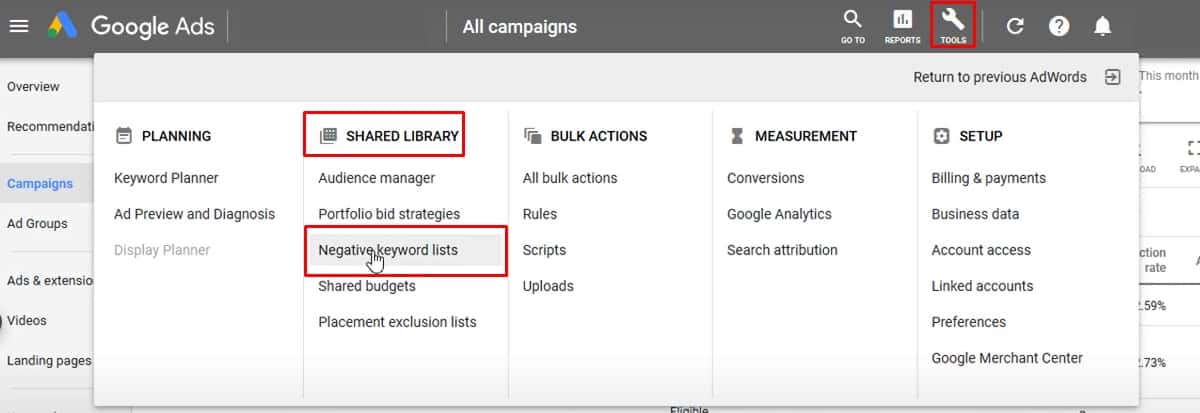
If you know that leads from “discounted plumbing services” aren’t your ideal prospects, add the keyword to your negative list.
You’ll avoid wasting your budget, so you can reallocate it to profitable search terms.
Optimise Your Bidding Strategy
Depending on your campaigns, industry, and audience, your initial bidding strategy may not generate the highest returns. This is especially true if you run complex campaigns with multiple ad groups.
Consider different bidding strategies, including target Cost Per Acquisition. Once you identify how much each customer costs to attract, adjust your bidding, so you’re not needlessly paying more.
A/B Test Your Landing Page
As any seasoned freelance PPC consultant will tell you, Google Ads evaluates your landing page to define your ad quality.
Your landing page should be specific to the ad.
If you’re advertising one product category, the ad needs to direct the lead to the specific page.
Experiment with different value propositions and offers so your campaign is tailored to the searchers and stands out among your PPC competitors.
Are You Ready to Make Your Google Ads Work Faster?
Remember to do your keyword and audience research before launching the campaign. Then, optimise carefully. Ready to take the reins? Achieve rapid Google Ads success in 7 easy steps with your copy of my best-selling Google Ads book!
Before you know it, your Google Ads campaign will generate results!
If you need expert assistance to ensure you get the maximum returns, get in touch with me. I’ve helped thousands of business owners get better results from Google Ads at a lower cost.
Today, I’d love to help you!
