
Google Ads News: December 2025

Last Updated on: 24th December 2025, 09:58 am
Welcome to another edition of Google Ads News – this time, post-Black Friday! The only reason I mention it is that Black Friday is a phenomenal litmus test of what works (and what doesn’t), and I came across two illuminating case studies.
In terms of the platform, it seems like Google Ads’ team is winding down for the holidays, but there are still updates – particularly when it comes to Performance Max and Google Shopping.
Google Ads News about Performance Max
1. Directly Upload Videos into Performance Max
Google now lets you upload videos directly into Performance Max instead of YouTube.
If you want to test video quickly (especially if you’re repurposing short product clips or UGC), this is a big step up!
For example, let’s suppose your team exports five 10-second variations for a promo. Previously, you’d have to go through YouTube, but now you can get them into PMax without needing YouTube channel access, approvals, and all the usual nine yards.
Unfortunately, there are caveats. You won’t be able to use these for remarketing, appeal rejections or restrictions, edit metadata, set custom thumbnails, and – of course – you won’t get the analytics you would with YouTube.
2. Google Ads News about Merchant Centre Videos for PMax
Google is starting a PMax beta that pulls product-associated videos from Merchant Centre during setup.
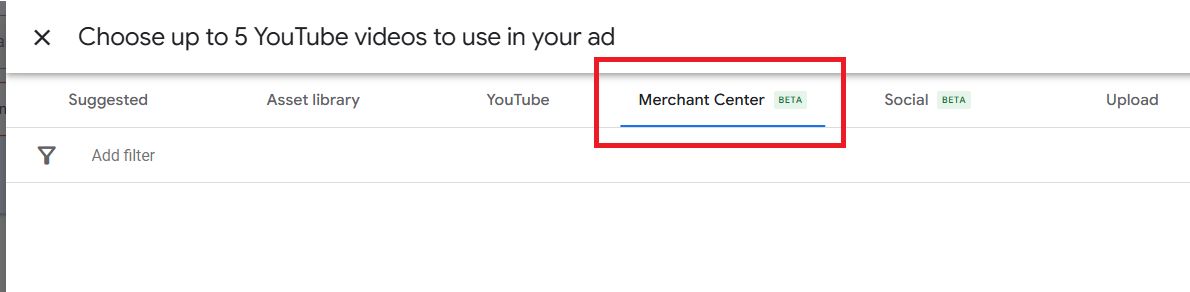
If you’re in retail or eCommerce, this piece of Google Ads news is another step toward the “feed drives everything” approach.
If you already attach videos to products in Merchant Centre, PMax can use that library to add them as ad assets.
If you only have a handful of products, this won’t mean a lot. However, if you have 2,000 SKUs and only your top 50 had video in PMax before (because that’s what you had time to build), this beta can help you expand video coverage across more of the catalogue.
Of course, treat it with a grain of salt and double-check that it’s pulling the videos you think are ad-worthy.
3. PMax Channel Reporting Expands to MCCs
When you’re managing hundreds of accounts, as agencies and Google Ads professionals usually are, you want to be able to analyse data at scale.
Previously, you had to log into each distinct account to see the data. Now, with PMax Channel Reporting expanding to MCCs, we get to see how Performance Max allocates spend for our campaigns and drives results across channels, including:
- Search
- Display
- YouTube
- Discover
- Gmail
- Shopping
… all without logging into each account individually!
This is still a feature being rolled out slowly, but it’s a positive signal for improved Performance Max visibility.
Case Studies and Insights
1. Retailers Paying for Google Ads Clicks on Out-of-Stock Products
ShoppingIQ ran a big study of 500 global retailers that found 97% kept paying for Google Shopping clicks on products that were no longer available, often for 24-48 hours after items sold out.
They also shared a pretty blunt detail: the stock refresh cadence is slow for most brands. 90% refresh around every 24 hours, and only 5% refreshed earlier than that. During higher-sales periods, products do fly off the (virtual) shelves, so it’s in everyone’s best interest to keep things fresh and avoid useless clicks eating into your margins.
If you’re an owner/operator or running an eCommerce business, out-of-stock clicks are a double-cost problem.
You pay for the click and get zero chance of a sale, which is the obvious part.
However, another problem is that your campaigns “learn” the wrong lesson at the worst time.
During peak demand, Smart Bidding is collecting data fast. If customers see unavailable products and bounce, your conversion rate drops when volume is highest. Automated bidding can respond by making your other products and categories less competitive.
For example, let’s say Black Friday weekend, you got:
- 8,000 clicks to Shopping
- 10% of those clicks went to products that were already out of stock
- Average CPC = €0.80
That’s 800 clicks × €0.80 = €640 straight waste.
But the bigger hit is that those 800 unsuccessful visits lowered your conversion rate and bidding signals.
My advice? If you only do three things before your next peak period, let it be these:
a) Optimise Your Stock Status Update Frequency
If you don’t know how frequently Merchant Centre reflects your real stock, you’re flying blind.
The study shows most retailers are effectively on a ~24-hour lag. Make sure you’re updating your stock as frequently as possible, and even turn it into a KPI for your team.
b) Align Your Marketing and eCommerce Ops Teams
The marketing team owns spend. The eCommerce Ops team owns stock. They need to meet regularly (in peak weeks, even hourly), or you’ll pay for the disconnect with your budget, margins, and long-term campaign performance.
c) Build a “Sellout Protocol”
When your most important SKUs sell out, you need a defined plan: swap to close alternatives, redirect budgets, adjust promotions, and update messaging.
The worst option is letting spend continue as if nothing happened.
2. Google Ads News about Black Friday 2025: Ads Are More Expensive, But Still Engaging
Optmyzr looked at 5,000 eCommerce and 16,000 lead-generation accounts connected to their platform to compare Black Friday performance year-over-year. The findings were quite interesting:
- Ad spend is up ~17% across eCommerce and lead gen.
- Impressions fell YoY (so visibility got more expensive).
- Clicks and CTR were up (engagement stayed strong).
- They also note lead gen saw a bit lower CPCs and a lift in clicks.
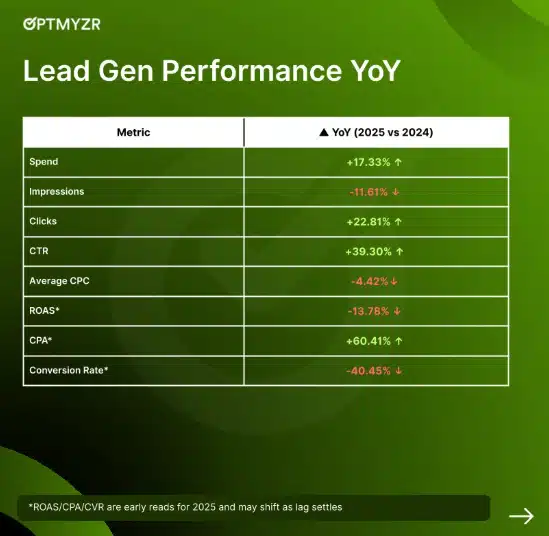
Key takeaway from these Google Ads news? You’re paying a bit more to show up, but your leads still want to click.
What makes a big difference is your PPC strategy.
Since traffic is here, it’s time to re-focus on what comes after: conversion, fulfilment, and profitability.
You could have great results from ads themselves, but if you’re, for example, discounting too heavily or seeing more returns than you normally do, your ROAS will decrease.
And while I always encourage you to optimise your Google Ads, sometimes that also means optimising the entire experience you’re promoting through Google Ads:
- Fixing mobile speed
- Simplifying checkout
- Making your delivery and returns terms clearer
- Improving messaging
- Improving response time
Realistically, if paid reach is more expensive, then you need to treat PPC as part of your profit system – not just a channel.
For example, if you have a better conversion rate, you can afford higher CPCs. If your stock accuracy is higher, you won’t pay for traffic that will bounce. If you follow up faster, you’ll get revenue faster.
These two studies were truly fascinating to me because they showed what we should always keep in mind: peak periods show where we are operationally weak. And once you can see it, you can optimise it.
Google Shopping Ads News
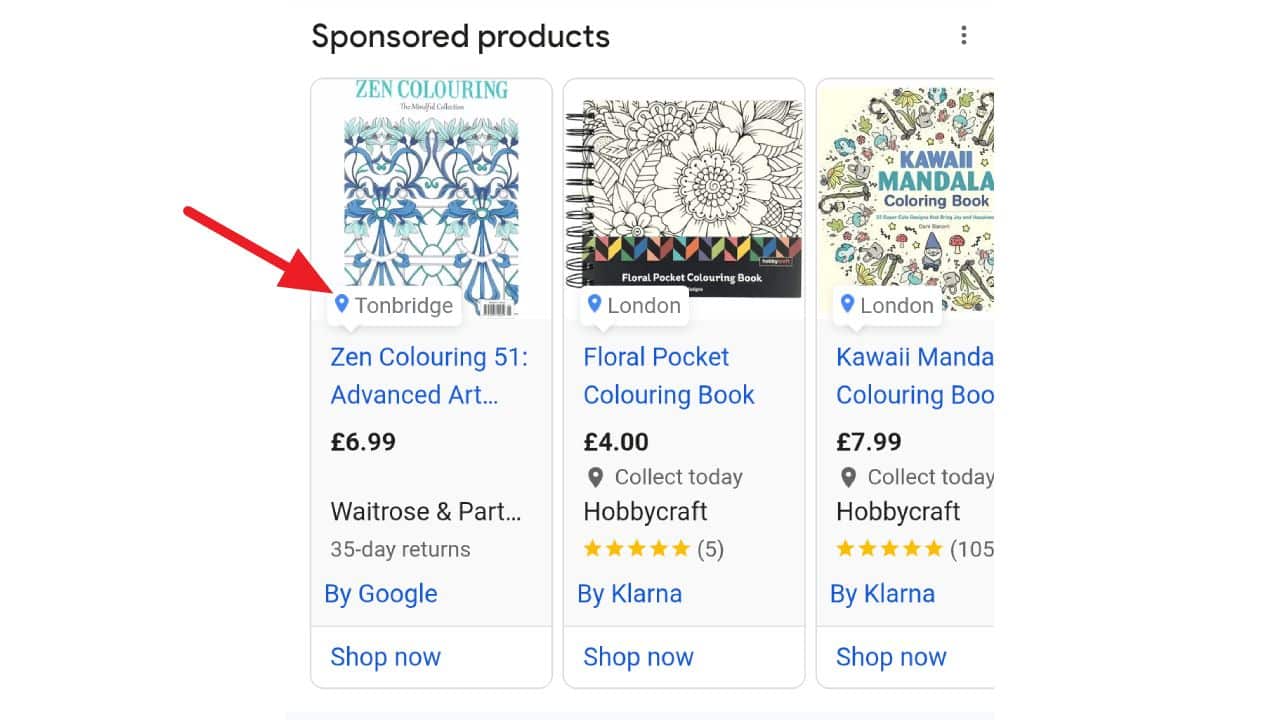
1. New: Merchant Location Labels in Google Shopping Ads
Google Shopping ads can now show a merchant location label (city or town), so shoppers can immediately see where you’re based.
If you’re not a huge brand, this is very helpful. Google is giving you a way to signal local relevance and trust right inside the ad without you needing to change your pricing or promotions.
If you’ve ever felt at a disadvantage competing against big retailers with endless budgets, this helps level the field slightly. A shopper who sees that you’re based nearby may assume faster delivery, easier returns, or even local pickup – all before they click.
2. Regional Member Pricing Tests in Shopping Ads
Speaking of neighbours, Google is testing region-specific member or loyalty pricing in Shopping ads.
If you run a membership, subscriber, or loyalty programme, this may allow you to show the true best price to leads eligible for it – in the regions where it applies.
For example, if your pricing differs by country, state, or delivery zone, this opens the door to much clearer price communication upfront.
It’s still a test, but it fits a clear direction: Google wants Shopping ads to reflect real commercial logic, not just static prices. And I, for one, am very excited to see it!
Other Google Ads News for December 2025
1. App Ads: View-Through Conversion Bidding
Google has added view-through conversion (VTC) bidding for Android App campaigns. In simple terms, you can now tell Google to value conversions that happen after someone sees your ad, not just clicks it. However, be careful: if you credit everything to VTC even when Google App ads are not the only things you’re running, you could risk misattributing your success.
2. Data Manager API
Google has launched a Data Manager API to help you connect, manage, and activate your first-party data inside its ad systems. If you’re already investing in CRM data, customer lists, or offline conversion tracking (as you should!), this makes it easier to actually use that data effectively rather than letting it sit in silos.
3. Custom Views for Your Overview Tab
This is by no means a big update to your Google Ads dashboard, but it is a helpful one. You can now create up to 5 custom views in the Overview tab. For example, you could focus on monitoring spend, conversions, CPA/ROAS, and alerts – without having to switch tabs.
Not Flashy Updates, But They Reduce Friction
This month’s Google Ads news may look small on the surface, but they all steer in the same direction: Google wants its Ads platform to be more reflective of real-world business signals, and it wants better data.
For retailers, that means Shopping ads are becoming more contextual and more commercial. Your feeds, pricing logic, and stock signals need to be reliable if you want your performance to keep up.
For other advertisers, Google is reinforcing the need to focus on the fundamentals: first-party data, clear definitions of success, and good landing page experiences.
So in 2026, don’t chase every new feature. Instead, know what’s changing – and know how strong your foundations are.
If you need help getting ready for 2026, contact me. Or get your copy of my best-selling Google Ads book that takes you through the key aspects of building profitable campaigns.
