
Google Ads News: January 2026

Last Updated on: 18th January 2026, 01:50 pm
Welcome to the January edition of Google Ads News! If December was about shopping-season practicality, January looks like a tidy-up: more experimentation for Shopping ads, tighter guardrails and controls at the account level, a subtle setting that could change your campaigns, and more.
Below, I’m sharing the details of this month’s Google Ads news, starting with the bits I’d personally audit first.
Shopping & Merchant Centre Google Ads News
1. A/B Testing Titles and Images in Google Shopping Ads
We’ve wanted proper Google Shopping Ads testing for years, and now Google is finally making a move!
The new experiments are showing up as “product data experiments,” and Google is suggesting you’ll get results in roughly 3-4 weeks.
Why I’m (Cautiously) Excited about These Google Ads News
Product feeds have always been the engine of Shopping performance, but testing has usually been more like “change the title format and pray,” because you’re editing the source of truth (and if you make a mistake, it applies everywhere).
This test moves Shopping closer to the kind of controlled experimentation we’re used to in Search. You won’t need to permanently rewrite your whole feed to run a single hypothesis.
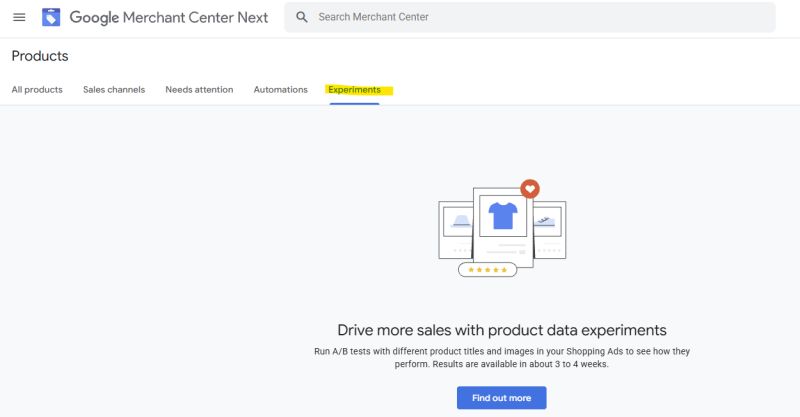
Google’s own framing suggests you can compare title/image variants and see which combination actually drives more sales. I say “suggests” because right now, the experiments are limited to a small number of merchants.
If you’re one of the lucky ones, here’s how I recommend starting with Google Shopping experiments:
- Title structure tests: brand-first vs. attribute-first; including key modifiers (“refurbished”, “bundle”, “XL”) vs. not.
- Image tests: lifestyle vs. packshot; zoomed-in detail vs. full product; “on white background” vs. contextual (within policy).
- Category-specific rules: Don’t test one global change across your entire catalogue. Start with a tight segment of products that behave similarly.
Note: If Google delivers results in 3-4 weeks, think about seasonality and promotional cycles.
A test that spans “normal week” + “sale week” can be technically valid but strategically misleading. If your prices/promotions change mid-test, you may be measuring “promo strength” rather than title/image impact.
2. Shopping Promotions Policy Updates
Google is also expanding what it considers an eligible Shopping promotion, and it’s very clearly trying to align policies with how people actually buy in 2026 (subscriptions, localised incentives, modern promo language).
Here’s what’s changing, in plain English:
- Subscription-based promotions are getting more support. Think free trials, percentage-off, or money-off tied to subscription fees, including formats like “Subscribe and save.”
- Google is loosening language restrictions to allow common promo abbreviations. For example, BOGO/B1G1 and MSRP/MRP. There will be fewer disapprovals for using language that customers understand.
- Brazil (but no one else) gets payment-method-based promotions (including certain cashback offers tied to digital wallets).
What I Would Do This Month
If you run subscriptions, look at your promo strategy and decide if you can make your best offer visible in the ad.
Subscription commerce is mainstream now, and Google wants that reflected in Shopping. And if you’ve historically avoided abbreviated promo language, you may have more flexibility now.
However, keep your messaging consistent in the ad and the landing page – Google and the Quality Scoring still don’t like mismatches.
Google Ads News about Total Campaign Budgets
You’ve probably seen total campaign budgets in Performance Max, but now you’ll be seeing them in Search and Shopping campaigns, too!
Total budgets allow you to set a total budget across a defined period (days or weeks) and have Google pace spend to use the budget by the campaign end date.
If you’ve ever run a 72-hour promotion, a product launch week, or a short test budget sprint, you’ll have felt that daily budgets can be a clumsy tool. You either spend too hard early and then panic-adjust, or the test underdelivers.
However, as with anything where you are giving Google the reins over your campaign settings, keep an eye on where it’s pushing spend inside the period – especially if your conversion rates vary by weekday or hour.
My Practical Take on Total Campaign Budgets
Use this for fixed-window campaigns (sales, launches, events), and not as a band-aid for campaigns that need structural work.
If your Search campaign only performs when you “babysit” daily budget pacing, the budget model isn’t the core issue.
Google Ads News about Controls and Brand Safety
1. A Quiet Setting that Could Change Your Creative
This one is sneaky, and it’s exactly the kind of thing that makes me warn clients and readers about the perils of letting Google auto-apply things in your account.
Google has added a setting in the Shared Library under Location Manager called “Google Owned Location Data.”
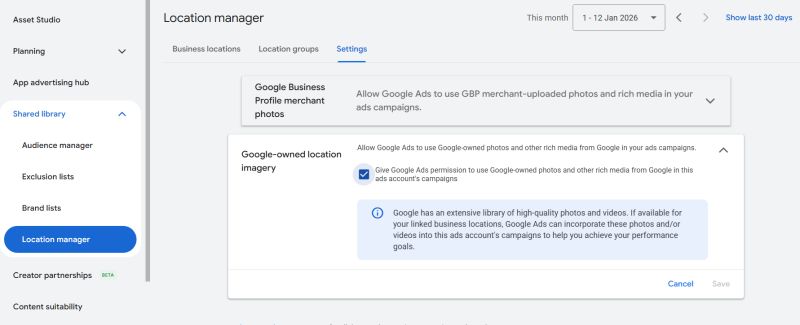
When enabled, Google can pull imagery from its own library and use it in ads related to your business locations. This means that visuals you didn’t upload or approve can appear in your ads.
Google talks about it as performance-supportive automation, but the brand control implications are clear:
- You may be in a regulated category like law or healthcare (as many of my clients are).
- You may be a franchise.
- You may have strict brand guidelines.
- Or you may simply not want Google making creative decisions on your behalf.
The key point is: you don’t want to discover it after the fact.
Go into Location Manager and check whether that setting is on. Even if it’s off right now, check in during your next regular review and ensure it stays off – especially if you use location extensions or location-based campaigns.
2. Account-Level Placement Exclusions
Google’s latest rollout of account-level placement exclusions means you can block unwanted inventory once and have it apply across eligible campaigns, including:
- Performance Max
- Demand Gen
- YouTube
- Display
Previously, exclusions were hard or downright impossible. But now, you can build a single exclusion list at the account level, and Google will prevent any budget from going to excluded placements.
This is a real step toward “automation with guardrails.” Google keeps pushing automated campaign types, and advertisers keep asking for ways to prevent spend from showing up in low-quality or unnecessary places.
How to Approach Account-Level Placement Exclusions
- Start with the placements you always exclude.
- Review what’s currently excluded at the campaign level and consolidate duplicates.
- If your account runs very different brands or business units, document what’s being blocked and why (your future self will thank you).
Remarketing in Google Ads Becomes Easier: Minimum Audience Size Is Now 100
If you’ve been following me for a while, you’ve probably noticed how much I love remarketing. It’s cost-effective and conversion-effective, after all!
And now, the latest Google Ads news also covers the reduction of the minimum audience size requirements to 100 active users across networks and audience types.
If you’re a smaller advertiser or a niche business, you’ll be able to start remarketing much sooner!
How to Use These Google Ads News and Start Remarketing
First, don’t put all your audience members into one list. Instead, build smaller segments that reflect intent (e.g., “pricing page visitors” or “cart abandoners”).
However, don’t automatically assume that smaller is better – it only counts when the segments are meaningfully different. For example, if they are categorised according to intent.
Google Ads API Tightens Conversion Data Rules
This is the one developers should circle in red.
Google Ads API will stop accepting new adopters of certain conversion-import fields, specifically session attributes and IP address data, starting February 2, 2026.
Existing implementations can continue “for now,” but Google is clearly steering complex conversion/user data toward the Data Manager API instead.
In other words, the Ads API is narrowing toward core campaign workflows, and Data Manager is becoming the long-term home for richer measurement payloads.
If a conversion import includes restricted fields without allowlisting, Google notes you may see errors like CUSTOMER_NOT_ALLOWLISTED_FOR_THIS_FEATURE, meaning the conversion was rejected (at least in partial failure responses).
If you’re not a developer, you should still care. “API changes” often become “why did reported conversions drop?” in about 3 seconds.
If your conversion tracking workflow uses imported conversions with extra context (session/IP signals), talk to whoever owns that pipeline now, not later.
How to Switch from Google Ads API to Data Manager API
Here’s what I recommend to my clients when navigating these Google Ads news:
- Remove restricted fields from Ads API imports as needed
- Migrate that data flow to the Data Manager API
- Treat Ads API conversion imports as something you’ll eventually phase out once Data Manager is fully working
Google won’t pull the band-aid off immediately, but the direction is clear: if you rely on rich imported conversion data, you need to migrate.
Creator Partnerships Get Search + A Management Hub
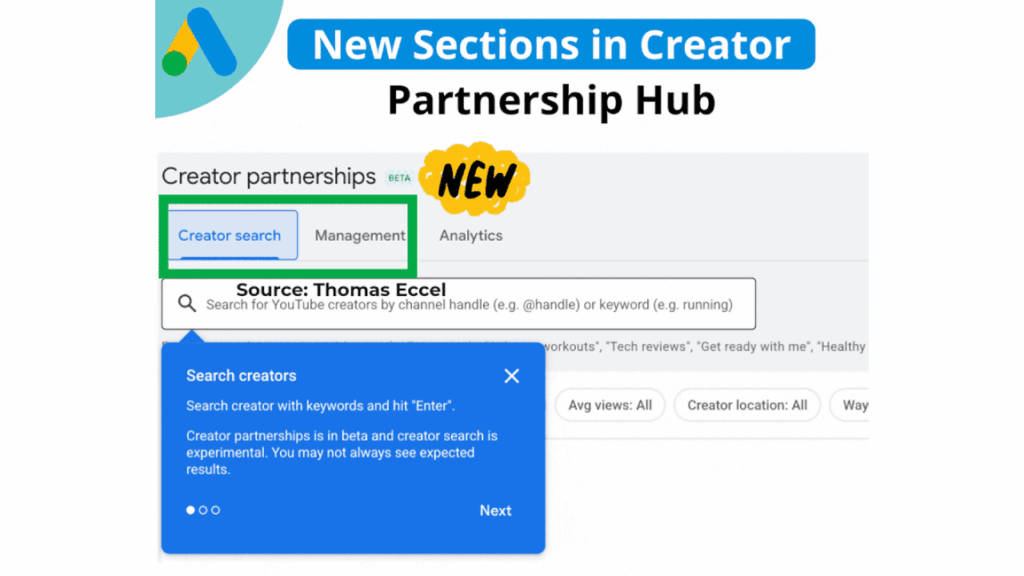
Google introduced Creator Search (beta), so you can now find YouTube creators by keyword or channel name. Plus, you can also filter by subscriber count, average views, location, and contact availability.
On top of that, Google added a Management section that makes it easier to communicate with creators. You’ll see their names, inquiry status, email subjects, latest updates, and response deadlines.
In creator collaboration, things often break at two points: discovery (“Who do we even partner with?”) and process (“Where are we with this creator, and who is waiting on whom?”).
Google understands the influence of – well – influence, so it’s reducing friction. And if you’re already running YouTube alongside other campaigns, this allows you to make creator work feel like part of your PPC strategy rather than a separate universe.
The January 2026 Google Ads News Theme: Automation with Guardrails
If I had to summarise January in one line, it’s: Google is expanding automation into more areas and simultaneously tightening the rules around it.
For advertisers, this means we finally get more options to control the automation in our accounts. And if you’re hawk-eyed enough (or read my monthly Google Ads news), you’ll be able to spot any new features which shouldn’t be turned on by default.
If you need a refresher on the fundamentals of profitable Google Ads campaigns, get your copy of my best-selling Rapid Google Ads Success book. Or contact me for personalised advice to make the most of your spend.
See you next month!
