
When To Use Google Ads Target CPA Bidding

Last Updated on: 28th November 2025, 09:31 pm
Not all Google Ads bidding strategies are equal. As I’ve mentioned in my Best Google Ads Bid Strategy article, one simple switch in your bidding strategy could even raise your conversions by 142%. So today, we’re talking about a data-driven approach that tailors your bidding to your revenue: Target CPA.
I’ll show you how target CPA bidding works in Google Ads and how to find your starting budget, plus – the best practices that have made my clients generate hundreds of thousands of pounds in additional revenue.
Let’s take a look!
What Is Target CPA (tCPA) Bidding and How Does It Work in Google Ads?
With the Target CPA (Cost Per Action) PPC bid management strategy, you specify the price you’re willing to pay for each conversion.
For example, if you know that this typical customer can generate £1,000 for you, you might be prepared to spend £300 to acquire them.
You set the goal and, based on it, Google uses AI algorithms to adjust your conversion-focused bids in real time and display your ads to people who are most likely to convert at that price range.
With this strategy, you dodge non-converting clicks and focus on getting more conversions at a cost you’re comfortable with.
For example, let’s say you’re running an eCommerce Google Ads campaign for your online shoe shop. You’ve set a £20 target CPA.
Once a user searches for “trainers” on Google, your ad is eligible to appear. Based on your tCPA, Google’s algorithm will consider various factors (like the user’s device, location, and other contextual information) and place a bid in the auction.
If the auction is competitive and the likelihood of conversion is high, your bid might be higher than £20 to secure the click. But if the auction is less competitive or the user’s behaviour suggests a lower likelihood of conversion, your bid might be lower.
Over time, the system will optimise the bids to deliver conversions at an average cost close to your specified target.
Now, for the burning question…
“Claire, What’s a Good tCPA in Google Ads?”
If I had a penny for every time a client asked me this question, I’d be packing for my trip to Mars. Unfortunately, the answer is as personal as your campaign goals. Determining what constitutes a “good” tCPA in Google Ads is like chasing a moving target.
Why?
Well, because what might be considered a good tCPA for one campaign or industry could be completely off the mark for another.
Think of it this way: “Good” is subjective, so avoid comparing apples to oranges. Again, it all depends on several things like your industry, competition, the value of a conversion to your business…and, of course, your ultimate goals.
I’ll be talking about goals (and how to define what the best tCPA for you is) in a bit more detail in just a moment. Follow me!
Are There Any Prerequisites to Start Using tCPA?
Set up Conversion Tracking to Start Using tCPA Bidding in Google Ads
Before you jump into tCPA bidding, make sure you’ve got conversion tracking set up. Without it, there’s really no point in getting started. Remember: this is a data-driven strategy. Google will need your historical performance data to fuel its bids.
You can take a look at my guide on setting up conversion tracking.
Review Your Google Ads Budget Settings
With tCPA, Google Ads might dial up your spending a bit to squeeze out more conversions. You should make sure your budget’s flexible enough to handle this!
For example, if your average daily budget is £100, Google Ads might need to spend around £200 on certain days to maximise conversions.
As another example, if your target cost is £20 per conversion, having a budget of £2000 gives Google Ads more leeway to maximise your conversions (compared to a daily budget of £50).
So, ensure your budget has a bit of wiggle room.
Understanding Your Goals
I can’t stress enough how tCPA bidding starts with a clear understanding of your campaign goals and desired CPA.
These goals include (but aren’t limited to):
- Increasing online sales
- Generating leads through form submissions
- Boosting website traffic
- Encouraging app installs
- Driving phone calls to your business
- Increasing brand awareness
Choose the conversion actions that matter most to your business and select the tCPA bidding strategy at the campaign level.
For example, if you’re running an eCommerce website and your primary goal is to drive online purchases, you might want to focus on the purchase conversion action.
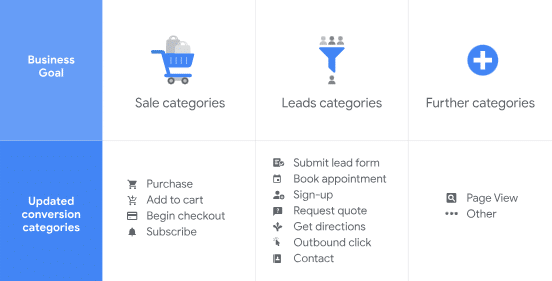
Or, if you’re managing a lead gen campaign for an accounting firm and your main goal is to get potential clients to fill out a contact form, you’d want to track the form submission conversion action.
You’ll notice how some of these actions are closer to the actual money-exchanging conversion action.
For example, if you optimise your bidding for online purchases, your target CPA can be higher. It’s a guaranteed conversion.
But if you are optimising for lead form fill-outs or phone calls, leads still need to take action to actually convert. That’s why you’d reduce your target CPA – not each “conversion” in Google Ads means money will reach your account.
Google Ads tCPA Best Practices
Collect Data to Optimise Against
If you’ve just launched your first campaigns, gather more data before diving into Target CPA bidding. With more data to work with, Google Ads can better understand your audience and fine-tune your bidding strategy for the best results, especially where attribution modelling is concerned.
Similarly, you need historical context on your customers and other conversion channels to evaluate how much you can realistically spend to acquire them without losing profits.
For example, you might normally spend £150 to acquire a customer. This will be your benchmark for evaluating Google Ads profitability because you can start with tCPa of £150 and evaluate if the costs increase or decrease.
Google Is Smart, But It’s Still Contextual
Let’s not forget that Google has its limits when it comes to controlling your CPA. External factors like tweaking your ad copy or refreshing your landing pages can make a huge difference, particularly when it comes to your Quality Score.
Learn to Leave Your Target CPA Campaigns Be!
Ah, the temptation to tinker! While it’s natural to want to check on your campaigns constantly, sometimes it’s best to let your Google Ads tCPA build its data foundations in peace.
(You wouldn’t keep opening the oven door to check if your cake is ready, would you?)
Give Google Ads enough time to do its thing. I usually recommend giving it 30 days to undergo the “learning phase,” after which you’ll start to see the real campaign results you can expect. At that point, analyse your account to see what your best-performing ads are, especially when compared to your real-world conversion data.
Once you see which ads attract the highest-value customers, start thinking about scaling them. This is where I recommend contacting a Google Ads coach, especially if you have found a tCPA that currently works for you.
There is always plenty that can be optimised in your account to increase your ROAS!
Is Target CPA Bidding Always Accurate?
While tCPA bidding is great for optimising your ad campaigns, it’s not for everyone. For my clients who are still in the early stages and may lack sufficient data, I often recommend starting with Manual CPC bidding. This allows them to stack up on valuable insights and gain control over their bids before diving headfirst into automated strategies.
Is tCPA the right strategy for your bids? A seasoned PPC consultant can help. If you need tailored strategies to turn Google into a lead-gen machine, don’t hesitate to reach out to me.
In the past 17 years, I’ve acquired over 15,000 customers for my clients and managed campaigns totalling more than £4 million in ad spend. I want you to join the crew who continuously achieves their advertising goals and drives real results, every time.
Looking for a quick fix? Grab a copy of my best-selling Google Ads book to start driving Google Ads success in just 7 steps!
