
Google Ads News: August 2025

Last Updated on: 24th November 2025, 12:47 pm
Hi there, and welcome to my latest Google Ads update roundup!
This month, Google’s cracking down on click fraud, allowing Performance Max targeting by gender, slipping in a cart data health check for eCommerce, and giving sitelinks a direct impact on ad strength.
And for Search, there’s a new way to test AI Max without cloning campaigns.
Let’s dive in!
Key Google Ads News for August 2025: Google’s Using AI to Block Fake Clicks
Google’s rolling out large language models from its Ad Traffic Quality team, Google Research, and DeepMind to catch invalid traffic with higher precision: bots, click farms, and “accidental” placements.
In their recent blog announcing these Google Ads news, Google claims they have already cut 40% of dodgy clicks tied to deceptive or disruptive practices. The models work in real time, analysing app/web content, placements, and user behaviour to spot the red flags before your ads have been served.
Why These Google Ads News Matter
If you’ve ever wondered why your “clicks” aren’t matching your leads or sales, this is often the culprit.
Invalid traffic dries up your budget, wrecks your cost-per-lead numbers, and can make it look like a campaign is performing when it’s just bots clicking.
I’ve seen accounts where 10-15% of spend was going on clicks from placements that were never going to convert, like kids’ gaming apps and irrelevant forums. If Google’s AI can stop more of this in real time, that’s fewer bad impressions, better audience targeting, and ultimately stronger ROI.
Now, no filter is perfect. Sophisticated click fraud evolves just as fast as detection methods. So while this is good news, you still need your own checks in place.
What to Do Next
- Check your placement reports. If you’re running Display or Performance Max, keep an eye out for irrelevant or low-quality sites/apps.
- Layer on your exclusions. AI won’t know your exact audience as well as you do. If a placement feels off, block it.
- Benchmark your CTR and CVR now, so that you can spot any genuine uplift from these new protections.
- Review network settings. If you’ve been burned before, reconsider whether you want Search Partners or Display expansion switched on.
Google Ads Performance Max Beta Now Lets You Exclude Genders
Aleksejus Podpruginas, Senior Google Ads Campaign Specialist at Teleperformance, has shared on LinkedIn that Google is currently testing a Performance Max beta that lets you exclude specific genders from your targeting.
This was first mentioned in the API v21 release notes, but it’s now surfacing in real accounts.

PMax has long been the “spray-and-pray” cousin of Search. Until now, you couldn’t tell it not to show your ads to a particular gender.
This new exclusion option changes that.
Why These Google Ads News about Performance Max Matter
I’ve seen too many Performance Max Shopping campaigns go through budgets showing men’s running shoes to women, or wedding suits to people who’ve only engaged with bridal content. This change means:
- Better click-through rates because your ads make sense to the viewer.
- Stronger conversion rates because you’re not dragging uninterested people into the funnel.
- Cleaner product feed reporting when you separate audiences.
What to Do Next
Once you have the new Performance Max gender exclusions in Google Ads:
- Duplicate existing campaigns by gender to adjust ad copy, imagery, and even product pricing if needed.
- Watch your ROAS and CPA closely! If you see lift, scale up before everyone else catches on.
- Keep your creatives sharp. Gender-specific targeting is pointless if the ad still feels generic.
Early access is THE performance advantage you can exploit while others are still running “No gender excluded” ads and wondering why their metrics are flat.
Google Ads News for eCommerce: The New Cart Data Health Check
Google started offering the new Conversions with cart data diagnostics tool. If you’re running eCommerce campaigns, you’ll want to check this.
The new cart data health check is essentially an audit of your product-level conversion tracker. It reviews the data you’re sending back with each sale (item IDs, prices, quantities) and tells you if something’s missing or mismatched.
Why These News Matter
If your cart data’s off, your reporting is off. And when your reporting’s off, your optimisation’s off.
That’s how you end up with “mystery” drops in ROAS or Google pushing irrelevant products because it thinks they’re converting. This tool gives you a chance to spot those cracks before they tank performance.
“Got it, Claire, but what does this tool actually do?”
Well, it…
- Checks that cart data is attached to every purchase conversion
- Flags missing details like item IDs, quantities, or prices
- Cross-references your IDs with Merchant Centre so Google’s not guessing
You get graded as Excellent, Good, Needs attention, or Urgent. And yes, they’re colour-coded so you can see the bad news instantly (if there is any).
What to Do Next
If you see flags, open the cart data health check report and dig into the flagged issues. Focus on the big red flags:
- Is the same product ID missing every time?
- Are quantities showing differently from what was actually sold?
- Do your IDs fail to match Merchant Centre listings?
If those IDs aren’t lining up, find the gap and fix it (I mean it). Once everything’s clean, run a test purchase to confirm the data comes through as it should.
Then, set a recurring monthly reminder to check this report. Tracking problems rarely arrive with fireworks. They chip away at your performance silently until you’re left wondering why your ROAS tanked.
Sitelinks Now Count Toward Ad Strength in PMax
Google’s slowly but surely changed how it calculates ad strength in Performance Max, and sitelinks are now officially part of the scoring system.
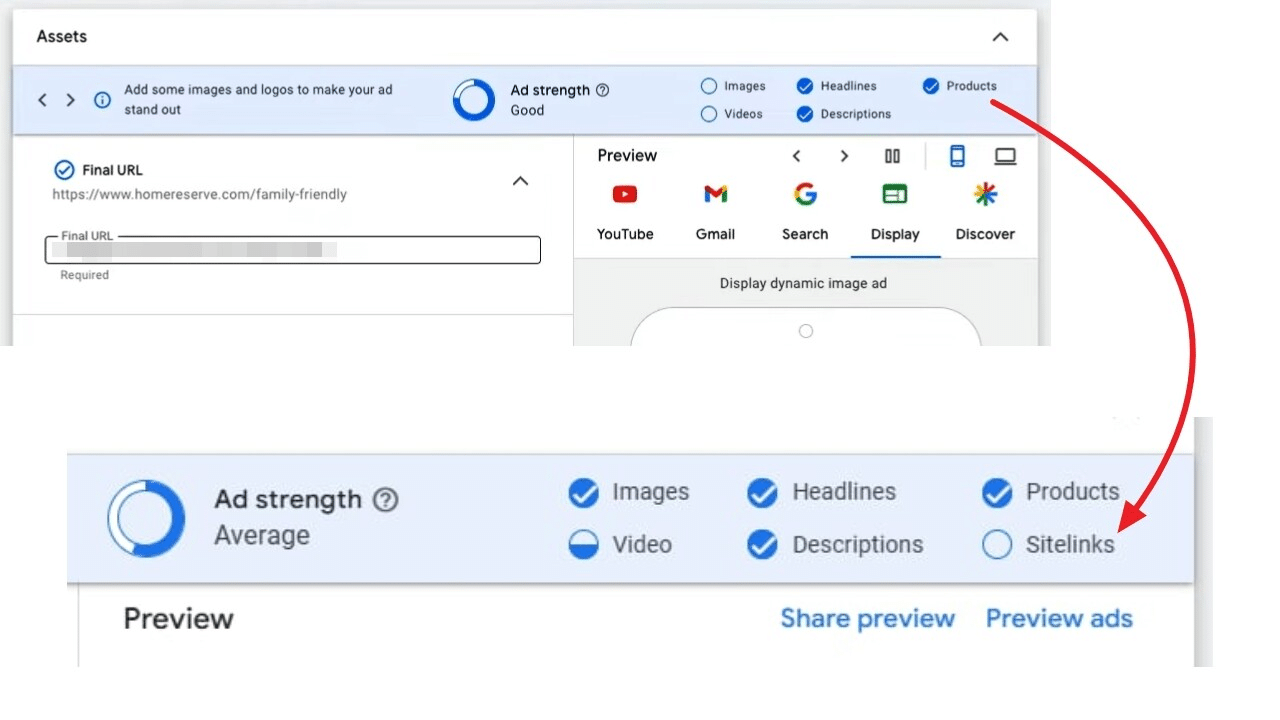
PPC specialist Vojtěch Audy spotted the change in the asset group interface, where sitelinks now sit alongside your images, videos, products, headlines, and descriptions.
Leave them out, and Google may start nudging you…or flat-out penalising your ad strength score.
Why These News Matter
Sitelinks have always been an easy way to give users more paths to convert. Now they’re also a lever in how Google judges the “completeness” of your asset group.
Low ad strength can and will affect how much reach Google gives you.
What to Do Next
Don’t treat this as “oh, I’ll add a couple of sitelinks next time I have a spare moment.” Open every PMax asset group you’re running and check:
- Do you have sitelinks in place?
- Are they still relevant and up-to-date?
- Are you giving Google multiple, conversion-friendly landing page options?
Think beyond the homepage. If you’re promoting a seasonal offer, a high-performing category, or a lead magnet, get those links in. With these Google Ads news, it’s time to start treating sitelinks as part of your creative set!
AI Max Experiments for Search: Test Without the Duplicate Campaign Hassle
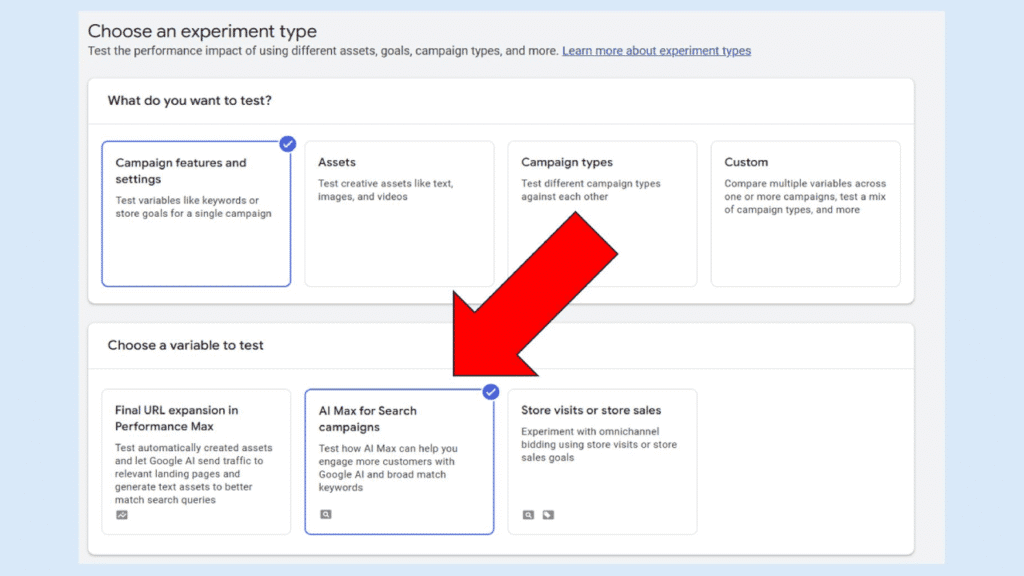
Google Ads has introduced a new experiment type for Search campaigns (AI Max Experiments). AI Max Experiments let you trial AI Max without spinning up duplicate campaigns. Your existing campaign budget will be split 50/50 between your control setup and the AI Max test, all under the same roof.
In the new Choose a variable to test section, you’ll now see AI Max for Search as an option. Select it and Google will auto-enable:
- Search Term Matching
- Asset Optimisation
You can adjust these at the campaign or ad group level, and “auto-apply” results is on by default. If you’d rather keep control until you’ve reviewed the numbers, switch it off.
Why This Matters
If you’ve been avoiding AI Max because the old testing process felt like a mini rebuild with double everything (duplicate campaigns, double the monitoring, double the mess), this is your shortcut.
Everything stays in one place, so you get results faster and with fewer moving parts to mismanage.
How to Act on These Google Ads News
- Head to your Experiments tab and check if AI Max is available for your Search campaigns.
- Before starting, define exactly what success looks like. Not just “more conversions” but the right conversions for your business.
- If you’re tracking leads, set up a quality review process during the test (for instance, CRM notes, follow-up calls).
- Run the experiment for at least two solid weeks of data before making any decisions.
- Monitor search terms daily in the first week to spot widening matches or irrelevant queries early.
- Watch CPA trends. If costs are climbing without quality improving, switch it off before the end date.
August Was a Big Month in Google Ads News, but What’s Next?
Google’s been closing gaps everywhere. In fraud detection, in targeting precision, in data hygiene…all while nudging you to play by its preferred rules.
That’s not a bad thing, but it’s easy to miss the small settings, betas, or prompts that make the difference between “fine” performance and standout results.
So, don’t skim this and think, “Good to know.”
Decide what you’re testing, what you’re tightening, and where you can move faster than your competitors.
The advertisers who act early are the ones who will see the lift.
If you need help prioritising changes or determining your competitive advantage, get in touch, or revisit the frameworks in my best-selling Google Ads book to make the right moves in the right order.
See you next month!
