
5+ Expensive Mistakes you’re Making Right Now in your Google Ads Account

Last Updated on: 30th January 2026, 02:38 pm
Is your Google Ads account not delivering the quality and volume of leads you’d like? Whether you’re running your own Google Ads or an agency is running them for you, you may be making these Google Ads mistakes right now.
Google Ads can still work brilliantly, but the way most accounts are set up today makes it far too easy to waste budget, train Google’s algorithm on the wrong signals, and end up with leads that look good in the dashboard but don’t turn into real customers.
In this guide, I’ll give you a practical breakdown of the Google Ads mistakes I constantly see in the accounts I audit, as well as the most impactful fixes.
The “Big 5” Google Ads Account Mistakes Behind Your Leaking Spend
I’ll show you the specific mistakes, but first, I want you to understand the 5 categories that cause the most damage:
- Your conversion tracking is teaching Google the wrong thing
- You aren’t controlling search terms and negative keywords aggressively enough
- Your campaign structure gives Google too much freedom to waste budget
- Your bidding strategy doesn’t match your account’s stage of maturity
- You’re letting automation (especially Performance Max) do whatever it wants
If you fix these five, you’re often 80–90% of the way to a mistake-free Google Ads account.
Mistake Category #1. Failing to Focus on the Right Tracking
When you make tracking and conversion Google Ads mistakes, you’re teaching Google’s algorithm the wrong thing.
1. Failing to Focus on Call Tracking
Proper call tracking is essential – especially as up to 70% of traffic will use the mobile version of your website. Ensure your website is properly optimised for mobile and that you’re making the best use of the appropriate features within Google.
These include:
- “Click to call extensions” within the Google ad that connect the prospect directly to your phone line
- “Click to call buttons” on your mobile website that will allow you to see which keywords are triggering calls
- Mobile bid optimisation, where it’s possible to increase or decrease bids depending on whether the prospect is searching on Mobile or Desktop
If you are targeting a variety of different geographical areas in your Account, call tracking becomes even more important.
You’ll need to order a different call tracking number for each city to increase the conversion rate (by reassuring customers with a local number). This doesn’t have to be complicated – a VoIP provider will charge as little as £2 per number per month plus the cost of forwarding the calls.
You’ll also need to ensure that Google Call tracking is then turned on within the account. This will show customers a local number, but also allow you to track the phone call as a direct conversion. You can even set the length of the call you want to set as a conversion – for example, 30 seconds.
2. Tracking the Wrong Conversions as “Primary”
This is one of the most expensive mistakes because it affects everything. If you tell Google that a form start is a conversion, Google will go and find you more people who love… starting forms.
I see this a lot with form starts, yes, but also click-to-call button clicks (without actually calling), contact page views, and time-on-site events.
These can be useful, but they’re not your main goal. Keep them as Secondary conversions for visibility, but make real business outcomes your Primary conversions:
- Form submitted
- Booked call
- Purchase made
3. You’re Optimising Conversions with Unstable Tracking, and That’s a Big Mistake
If your tracking breaks and you’re running Maximise Conversions, performance can drop fast. Google’s algorithm is trying to optimise towards conversions… and suddenly it can’t see them.
So it assumes performance is terrible and starts making worse decisions.
This is especially painful when a campaign is already running on Maximise Conversions, because the system needs clean signals to do its job.
If you’re dealing with this Google Ads mistake, the fix is simple:
- Run regular conversion checks in Tag Assistant / GA4 DebugView
- Don’t make big bid/structure changes while tracking is broken
- If you suspect tracking is unreliable, consider temporarily switching to Maximise Clicks with a CPC cap (more on that below)
And on that note…
4. Using “Maximise Conversions” with Poor Data
If your conversions are poor quality, Maximise Conversions will bring you more of the same rubbish. And that’s not Google being “broken,” but Google doing exactly what you asked it to do: optimising towards the easiest conversions it can find, which are often spam, low-intent, or irrelevant searches.
Fix the poor quality data Google Ads mistake:
- Clean up conversion actions first (Primary vs Secondary)
- Clean up search terms + negatives (next section)
- Only use conversion-based bidding once your conversion signals are trustworthy
Google Ads Mistake Category #2. Search Terms and Negative Keyword Mistakes
Search terms dictate who should see your ad, but negative keywords put safeguards so the wrong people don’t. This is why this category is one of the biggest levers for saving your budget.
5. Not Reviewing Search Terms Like It’s Your Job Is One of the Biggest Google Ads Mistakes
If you do nothing else after launching a campaign, do this:
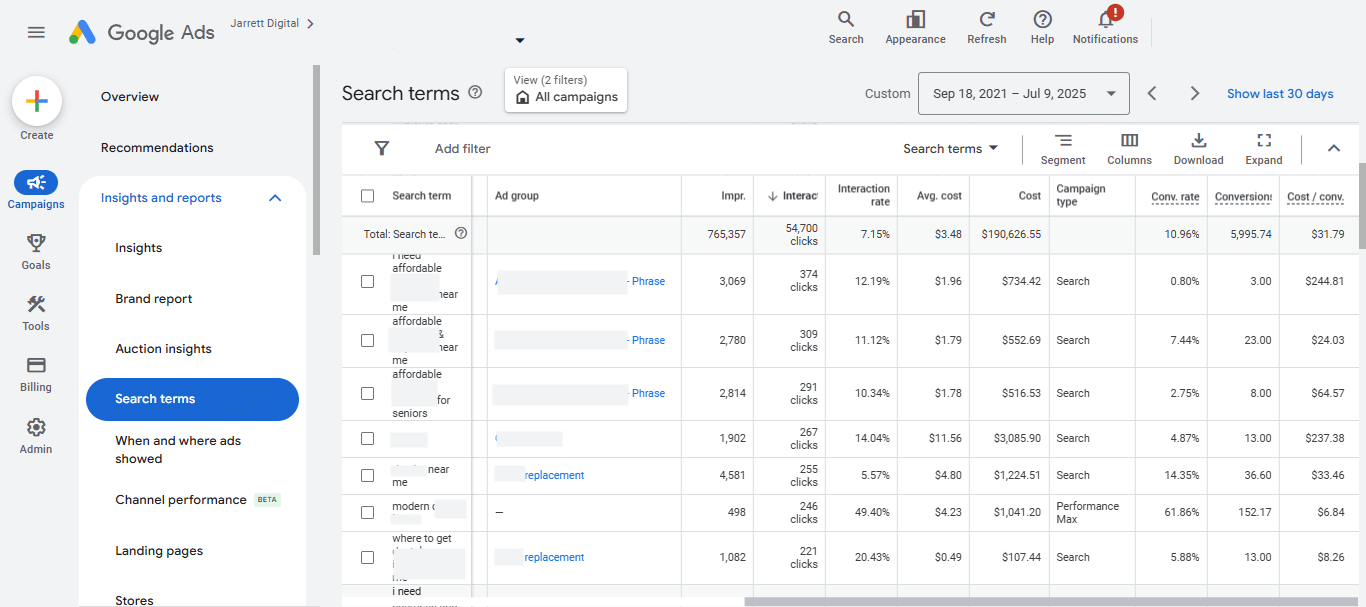
Check search terms. Regularly.
Because Google will match your keywords to things you didn’t expect, even if you’re using “phrase match” or “exact match”.
So in the Search Terms Report, you’ll find where your budget is “leaking”: wasted spend, competitor traffic, irrelevant intent, and spam patterns.
6. You Don’t Have Shared Negative Keyword Lists
Usually, when I audit Google Ads accounts of companies that contact me by saying they’re experiencing lead quality problems, what I find is inconsistency.
Negative keyword lists are different for each campaign. The teams reinvent the wheel, and many, many low-quality terms fall through the cracks, wasting spend.
Fortunately, the solution is simple: build shared negative keyword lists that you apply to every new campaign/account as a baseline.
For example, create shared lists like:
- “Universal negatives”
- “Competitors”
- “Low intent / research queries”
- “Jobs / careers / training”
- “Free / cheap / discount / coupon”
- “Student / school / course”
Then, apply them everywhere.
7. Are You Making the Google Ads Mistake of Paying for Competitor Traffic?
Probably not consciously, but you would not believe how many Google Ads accounts I see that do it accidentally.
Here’s the problem: if you’re showing up for competitor names without a clear competitor brand campaign strategy, you’re often paying for clicks that don’t convert.
Even worse: you’re paying for people trying to contact someone else.
One of the simplest workflows to prevent this Google Ads mistake is:
- Use AI to generate a competitor list for the local market
- Add 50–100 competitor names as negatives immediately
- Then, create a “Competitors” shared negative list
- Update it monthly
If you want to bid on competitors, do it intentionally in a separate campaign – not by accident.
8. You Are Keeping Your Impressions High, but Your CTR Low
Here’s a counterintuitive truth: We want your impressions down.
Fewer impressions (on more relevant searches) usually means that you get higher CTR, higher Quality Score, and lower CPCs.
Sure, “big reach” looks good on a report, but it often means big waste and not enough lead generation.
If you’re seeing high impressions and very few conversions, here’s what I want you to do to fix this Google Ads mistake:
- Remove irrelevant search terms even if they “only” got impressions
- Stop trying to show up for everything
- Focus on relevance and intent
And speaking of relevance and intent…
9. You’re Not Focusing on Quality Score
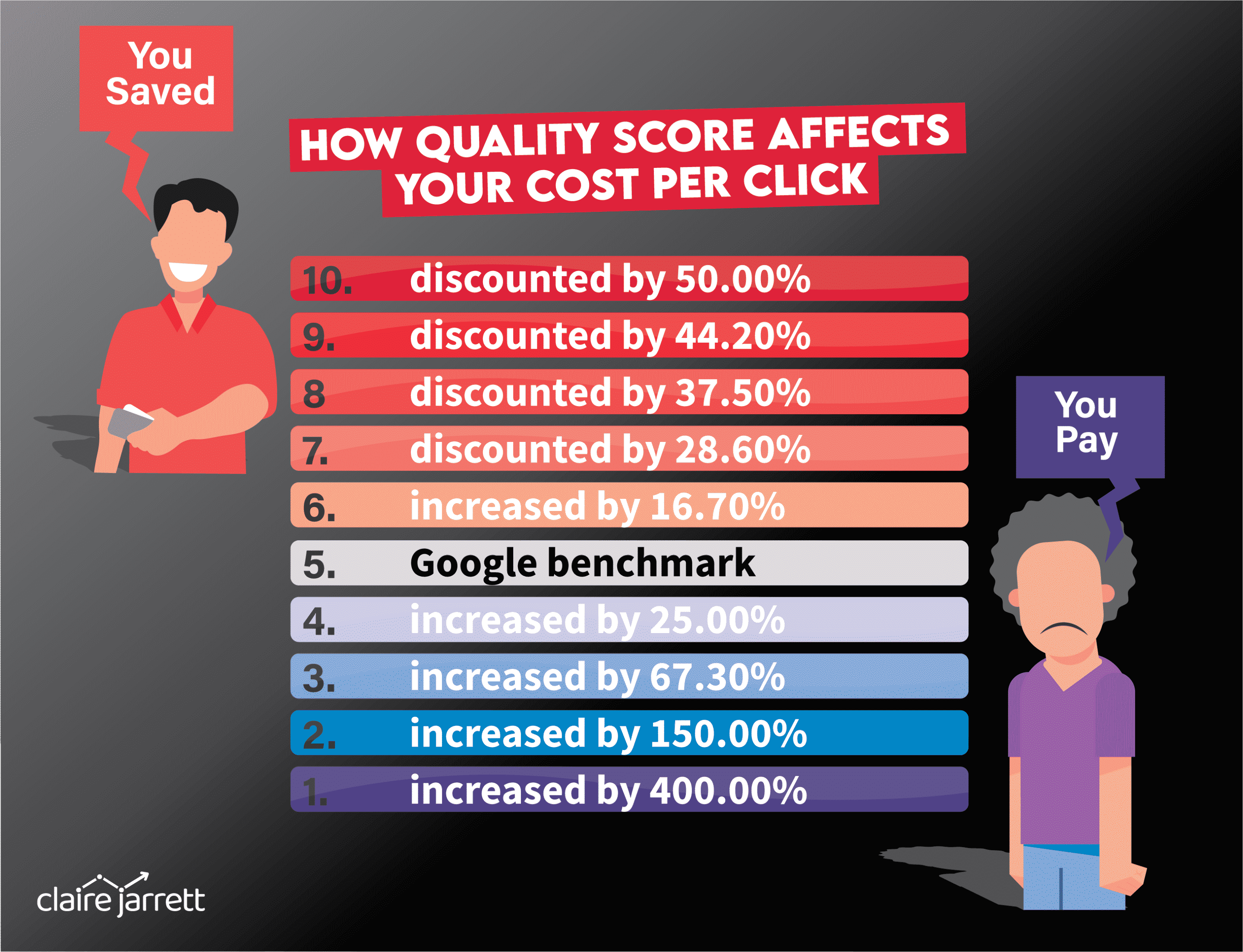
Quality Score (QS) is the single most important metric within your account. It’s based on how well your keyword is performing in relation to the ad you’ve written for it, plus the landing page you’re driving traffic to.
It also affects how much you spend on your Google Ads; QS can quadruple your click costs if your score drops from a 10 to a 3. However, a low score will actually prevent your ads from showing at all! (As Google prefers to show those with a higher score, as it regards them as being a better match for the query the prospect has typed).
A low click-through rate on your ads will rapidly lead to a lower QS, as will a poor-quality landing page that doesn’t match what the user is searching for.
So, as part of your ongoing maintenance each week, you’ll want to keep an eye on QS so you can identify any issues, then create new landing pages and new adverts as needed to increase it.
10. Did You Check for Click Fraud?
Click fraud is a well-known issue within the industry, and the good news is that Google has become progressively better at preventing it.
However, you’ll never know if it’s secretly affecting your campaigns unless you analyse your Invalid Click reports. If they show you there’s a problem, then you’ll want to consider using a Clickfraud service to prevent it from eating up your budget or contact Google Ads Support.
Mistake Category #3. Structural Google Ads Mistakes
11. Your Ad Groups Should Be Campaigns (And There’s a Budget Reason for That)
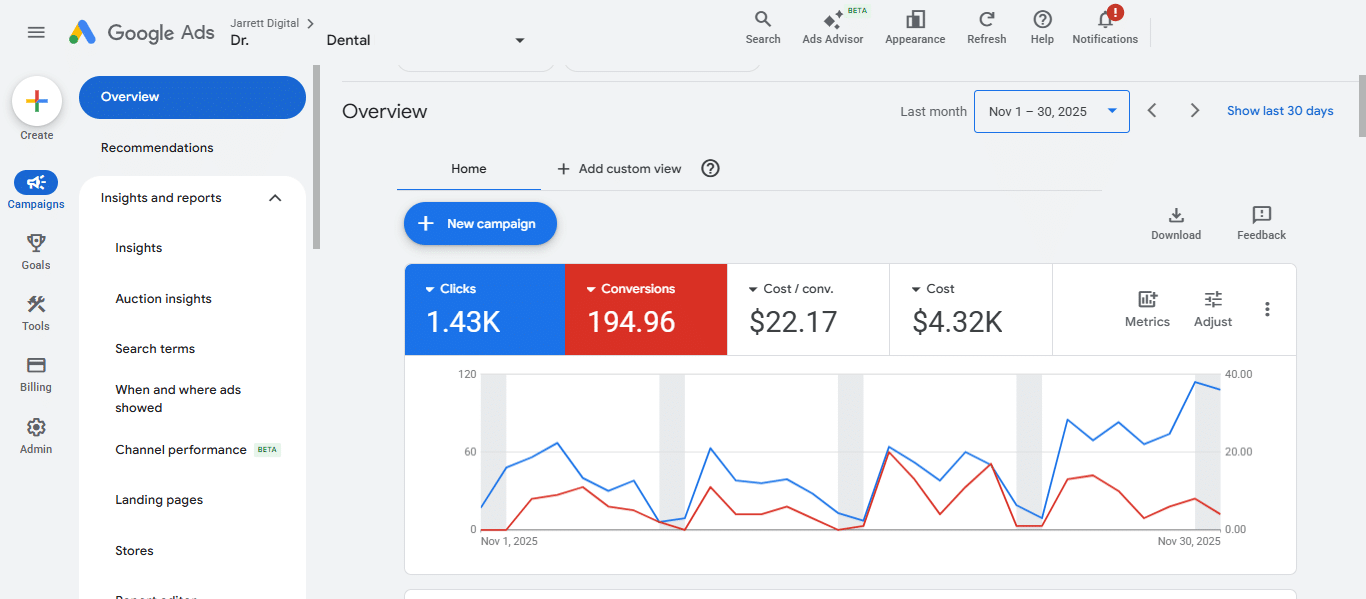
This is one of the most common structural mistakes. For example, when I audit dentistry Google Ads accounts, I often see them building one campaign with ad groups such as:
- Emergency
- Invisalign
- Veneers
- Whitening
- Root canals
The problem is that the budget is controlled at the campaign level. So Google will pick the easiest one to generate leads and starve the rest.
You need to promote key services into their own campaigns when possible, so you can control budget, bidding, messaging, and landing pages.
This ties into what I explained about the Quality Score above: Google values relevance. And if you are trying to target different services and intents within 1 campaign, it is not going to go well.
12. Putting Too Many Keywords in a Single Campaign Won’t Make Your Task Easier for You
In the worst-case scenario, it will also lose you money, so you’ll have two problems.
If an ad group has 30, 50, 100+ keywords, you’ve made your job harder. You can’t write relevant ads, optimise them, or even control what is going on.
So break your ad groups by intent. For example, you might do it by “near me,” “cost,” “service,” etc.
However, be careful with the price intent.
It’s a double-edged sword, in which it can be great – or completely destroy your lead quality.
Someone searching “dental implant cost” is not the same as someone searching “best dental implant surgeon near me”.
It might seem like the first is pricing intent, but it’s actually informational and usually appears very early on in your cosmetic dentistry lead’s buyer journey. In many cases, they’ll give up before they ever look for services.
And you don’t want to waste your budget on clicks that will never pay off.
So, segment price keywords into their own ad group, give them a landing page that addresses pricing, and regularly review the Search Terms Report to see which queries it’s showing up for – and whether they generate actual leads.
13. Multiple Locations = Multiple Campaigns
If a business has multiple offices/locations, the cleanest set-up is to have one campaign per location. This way, each location gets its own budget, geo targeting, and clean reporting.
You can clone these campaigns and change the location (plus the number to make it local), but it will give you clearer reporting and a better understanding of what the leads in that particular area look for.
14. Lack of Ongoing Optimisation
Managing a Google account effectively takes work on an ongoing basis.
This includes analysing the Search Terms Report regularly to identify new negative keywords (that prevent your ads from showing when the prospect includes that particular word).
A well-managed account will have well over 500 negative keywords to prevent the account from being charged for irrelevant searches, with new ones being added each week.
Secondly, as long as your conversion tracking is set up correctly (including all your Click to Call buttons on your mobile website), you’ll be able to analyse what is most likely to result in a conversion.
Based on these reports, you’ll be able to set “bid modifiers” that will adjust your bids and ensure you’re more likely to get a conversion based on:
- Day of the week and time of day
- Gender
- Age
- Location (all the way to postcode/Zip code level)
- Device type (Desktop, Tablet, Mobile)
Finally, you’ll want to keep an eye daily and weekly on Auction Insights:
- What is your average position?
- Have you dropped or risen?
- Have your competitors?
- Have any new competitors entered the market?
You’ll want to analyse: who is above you, and what percentage of the time are they above you?
How often are your ads showing when they “could” be?
If this metric is dropping, you’ll want to look at your bids, but also your Quality Score for the answers. For example, I’ve seen examples where the advertiser’s ads have stopped “competing in the auction” 83% of the time – meaning they rarely show!
Mistake Category #4. Bidding Strategy Mistakes
15. You’re Starting Conversion Bidding Too Early (And Here’s Why That’s a Critical Google Ads Mistake)
If you don’t have clean, recent conversion data, conversion-based bidding can backfire. In that case, the right starting point is often:
Maximise Clicks + a CPC bid limit.
That gives you traffic you can control, data you can clean, and more space to build negatives.
Once you do have it, you can start conversion bidding.
16. Using Maximise Clicks without a CPC Bid Cap
If you run Maximise Clicks without a bid limit, Google can decide to spend £30, £50, or even more per click. If you don’t catch it quickly, your budget disappears.
I always recommend setting a CPC cap from day one, even if it’s a rough estimate, because humans forget – and Google will take your budget.
Then, based on impression volume, tweak it up/down.
17. Don’t Make the Google Ads Mistake of Postponing Target CPA
Maximise Clicks is not the destination. It’s just a starting point for getting to smarter bidding strategies.
If you have enough conversion volume and clean conversion signals, Target CPA is often the stable “end state” for lead generation, because it smooths results and gives predictability over your ad spend returns.
Don’t be afraid to start using it – but make sure you have been tracking the right conversions and have clean data first.
Mistake Category #5. Uncontrolled Automations and Performance Max Are Where Accounts Go to Waste
18. You Trust Performance Max Too Much Because the Results Look Good (But Don’t Feel Like It)
Performance Max is simultaneously great for volume, but awful for quality. It can generate lots of leads, but unless you’re keeping a close eye on it, those leads can be the exact opposite of the ones you want.
It can even inflate reporting by pulling in brand traffic, irrelevant searches, and “junk” conversions. Things will look good until you look at your revenue at the end of the quarter and realise you’ve spent (hundreds of) thousands with no new revenue to show for it.
The fix? Don’t use PMax as your main strategy unless you have strong negatives, clear audience controls, and solid conversion goals.
Otherwise, it will just drain your budget.
19. The Biggest Hidden Google Ads Mistake? Not Turning Off Google’s Automatic Settings
Automation doesn’t replace strategy. It amplifies whatever you’ve built – good or bad. If the foundation is messy, automation just helps you waste budget faster.
Unfortunately, Google has a lot of settings that are turned on by default when setting up your account, or that it will suggest are turned on over time. These are supposedly meant to make your life easier, but in reality, just make Google more money.
So, for example, Google will suggest your ads run across YouTube and its other partner websites. Unless you are intentionally doing it, this will be a huge waste of money!
Many advertisers are now wise to this and have turned this off, but there are plenty of other automatic settings that have popped up recently.
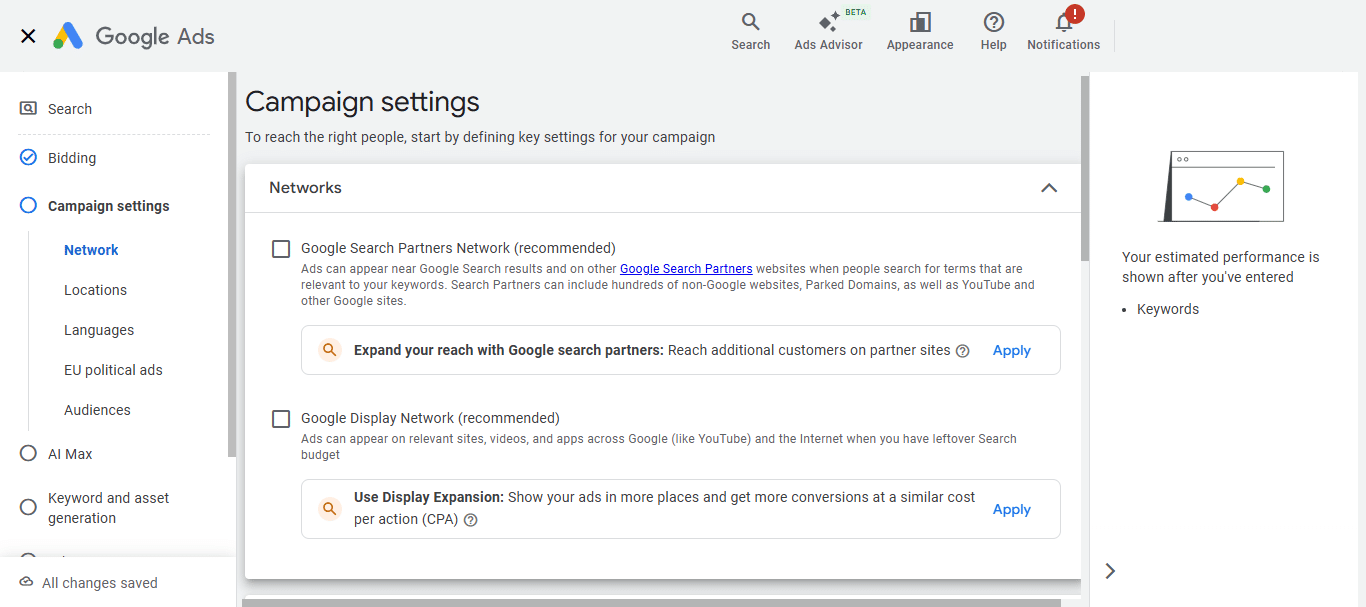
A couple of example settings to watch out for are features such as Automatic Ads (where Google creates an ad for you and adds it to the account), plus Automatic Site Links (where Google identifies random pages in your website, offers these to the prospect within your ad, and then charges you when they visit them).
These must be turned off in the Account Settings to ensure Google is not able to apply these.
Then, make sure you clean up the mess and come to a clean foundation:
- Clean the conversion “fuel”: Make sure you have the right conversions set as Primary, that you’re tracking single conversion actions, and that your tracking is stable.
- Build boundaries with negative keywords and regular reviews of the Search Terms Report.
- Use automation in stages, not all at once.
- Check your “corners”: Search Partners enabled for campaigns (full of spammy clicks), Performance Max running unchecked, audience exclusions… Keep a close watch on these!
- And never – not ever – let Google auto-apply suggestions or automations to your account.
Want Help Building a Winning Google Ads Strategy?
Your account doesn’t have to be suspended for you to be unhappy with the results. So if Google Ads is not bringing you the results you’d like, contact me for a personalised audit and plan.
And if you want to take back control over your Google Ads account, learn how to set up profitable campaigns and achieve rapid Google Ads success in 7 easy steps with your copy of my best-selling Google Ads book!
